One subscription instead of a stack of them

Stop paying for a stack of apps.
Keep $1,253 a year.

Pagewing is a Chrome extension for anyone who works in the browser that puts a screen recorder, a full-page screenshot tool, a PDF editor, a link shortener, a text expander and a bookmark manager in one side panel next to the page you're on. Paying the leading app for each of those jobs comes to $134.44 a month, with a sign-in for every one. Pagewing does them all, and more, for $30/month.

Free plan, every tool, no card neededPremium from $20/month, no free-plan limitsPro: $30/month for everything

Your stackTurn off the apps you don't pay for.
14 apps, paid separately
$134.44
Pagewing Pro, every tool
$30/month

You keep $104.44 a month

$1,253 a year

The math

Add up what you're paying now

Every job below usually means another app, another sign-in and another monthly bill. Here's what the leading app for each one charges, next to the one price that covers them all.

What the leading app for each job charges, billed monthly
The jobTypical appPer month
Record your screenTop screen recorderBusiness plan with AI, billed monthly$24
Edit, sign and convert PDFsTop PDF editorPro plan, yearly commitment billed monthly$19.99
Notes and clips on any pageTop web highlighterPro plan, billed monthly$15
Save articles, highlight and read them laterTop read-later appPaid plan, billed monthly$12.99
Short links and QR codesTop link shortenerEntry plan, sold yearly only ($120/year)$10
Block distracting sitesTop site blockerPremium plan, billed monthly$8.99
Capture and mark up screenshotsTop screenshot extensionPro plan, billed monthly$8
Reminders by notification and emailTop reminders appPro plan, billed monthly$7
Track time on projects and report itTop time trackerStandard plan, billed monthly$6.99
Save, restore and share tab sessionsTop tab and session managerProductivity plan, billed monthly$6
Know when your emails are openedTop email trackerPlan with link tracking, billed monthly$5.99
Text templates and shortcutsTop text expanderPro plan, billed monthly$3.49
Organize your bookmarksTop bookmark managerPro plan, billed monthly$3
Draw and highlight on screenTop screen annotation appPro plan, billed monthly$3
Paying for each one separately$134.44
Pagewing Pro, every tool and feature included$30/month

You keep $104.44 a monthThat's $1,253 a year back in your pocket.

Prices are the published US price of the leading app for each job, for one person, billed monthly where it's offered (two only sell yearly, so those show the yearly price per month), checked October 2026. Those apps differ from Pagewing in places, and some do more in their own field.

One price, every tool

No add-ons and no paying per tool: every tool is in every plan, the free one included, and every tool we add next joins them.

Your files stay with you

Bookmarks never leave your computer, recordings only when you share a link, and notes stay in your browser unless you turn on sync. Screenshots go to your own account, only so you can edit them.

Beside the page, on every browser

The tools open in a side panel next to the tab you're using, and your plan follows you to every computer you sign in on.

The tools

Everything in the box

Open the panel, then search, pin your favorites or pick from the list. Here's what each tool does.

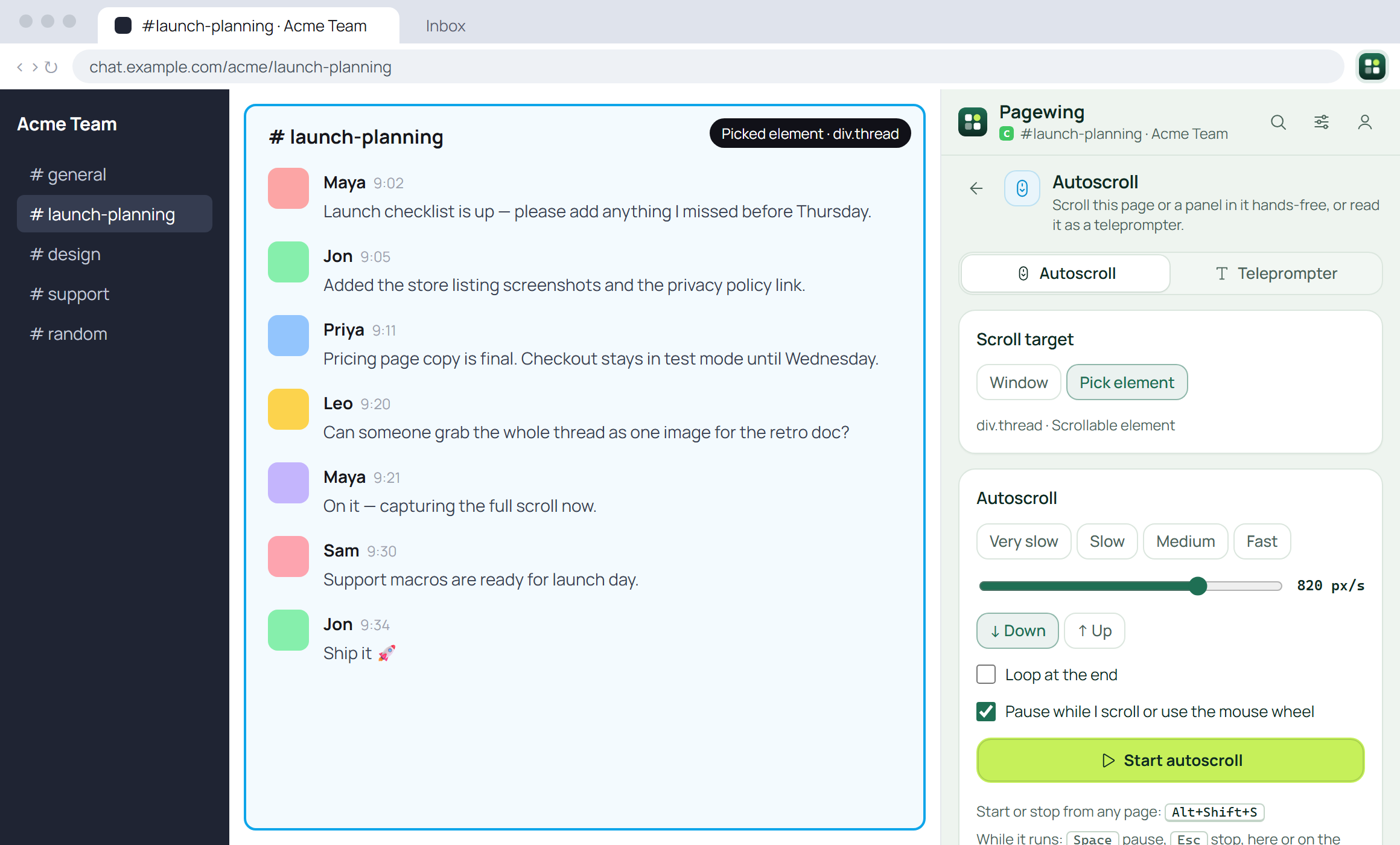
Pagewing side panel autoscrolling a chat thread picked on the page

Hands-free scrolling and screenshots you can mark up

Smooth at any speed, on any panel: scroll the page or just a feed or chat, or read it as a teleprompter. Full page, any scrolling panel, and an editor that does steps and blur.

  • Alt+Shift+S to scroll, Alt+Shift+P for a full-page shot
  • Arrows, text, highlighter, blur and numbered steps
  • Every capture in one library, as PNG, JPG, WebP or a stamped PDF
Open your screenshots
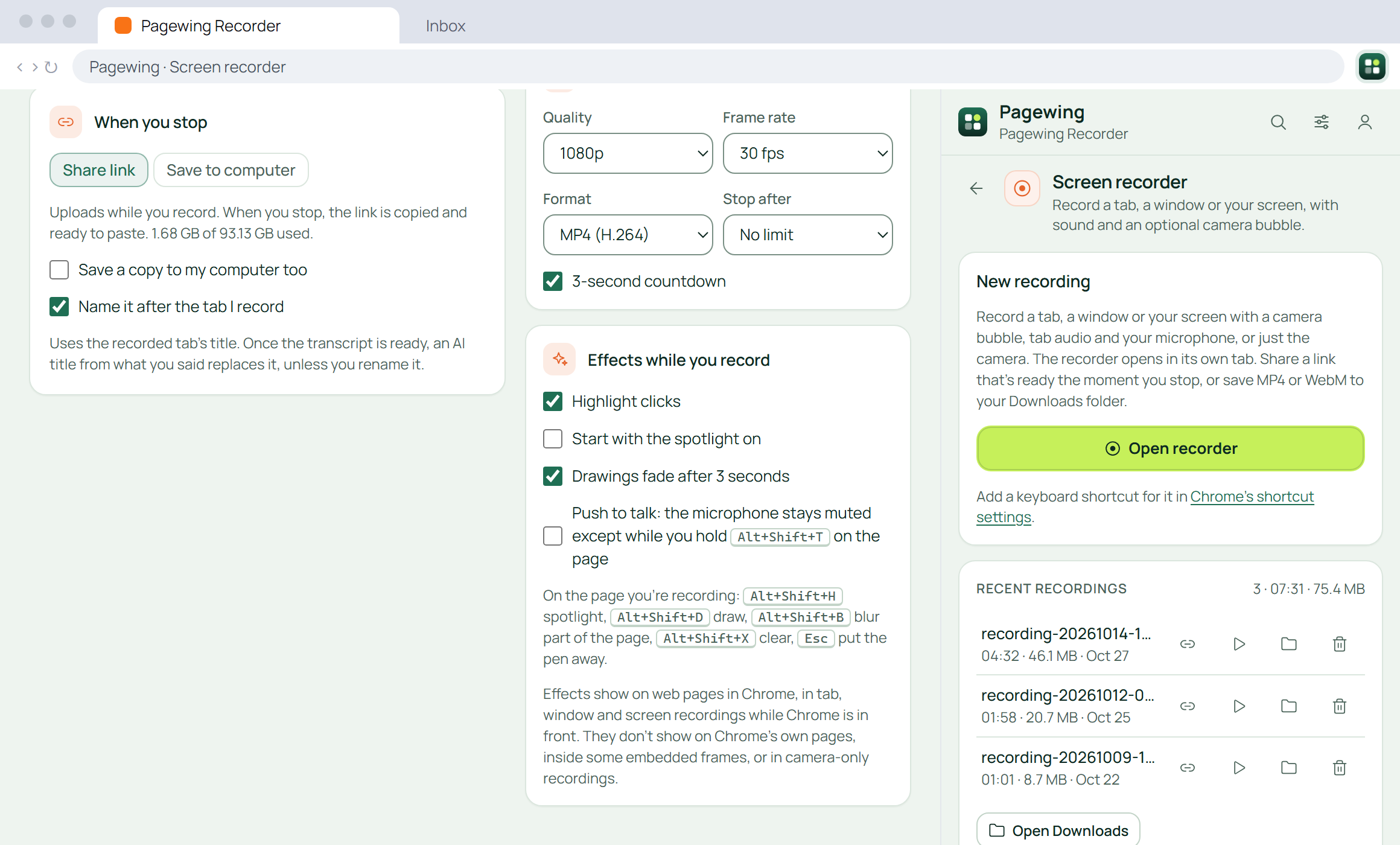
Pagewing screen recorder next to its side panel

A screen recorder that's already there

Record a tab, a window or your whole screen, with tab audio and your microphone. It uploads while you record, so when you stop, the share link is already on your clipboard. Or save the file to your computer.

  • Your camera as a bubble, or on its own
  • Share links with comments, reactions, captions, a transcript and AI titles, and on Pro, AI summaries, chapters and your logo
  • Trim and cut on a waveform, without re-uploading
  • A library on the web: who watched and how far, and grab any frame to mark up
  • Upload videos you already have and share them the same way
  • No cap on how many you keep, and never locked: 720p to source, MP4 or WebM, saved to your computer
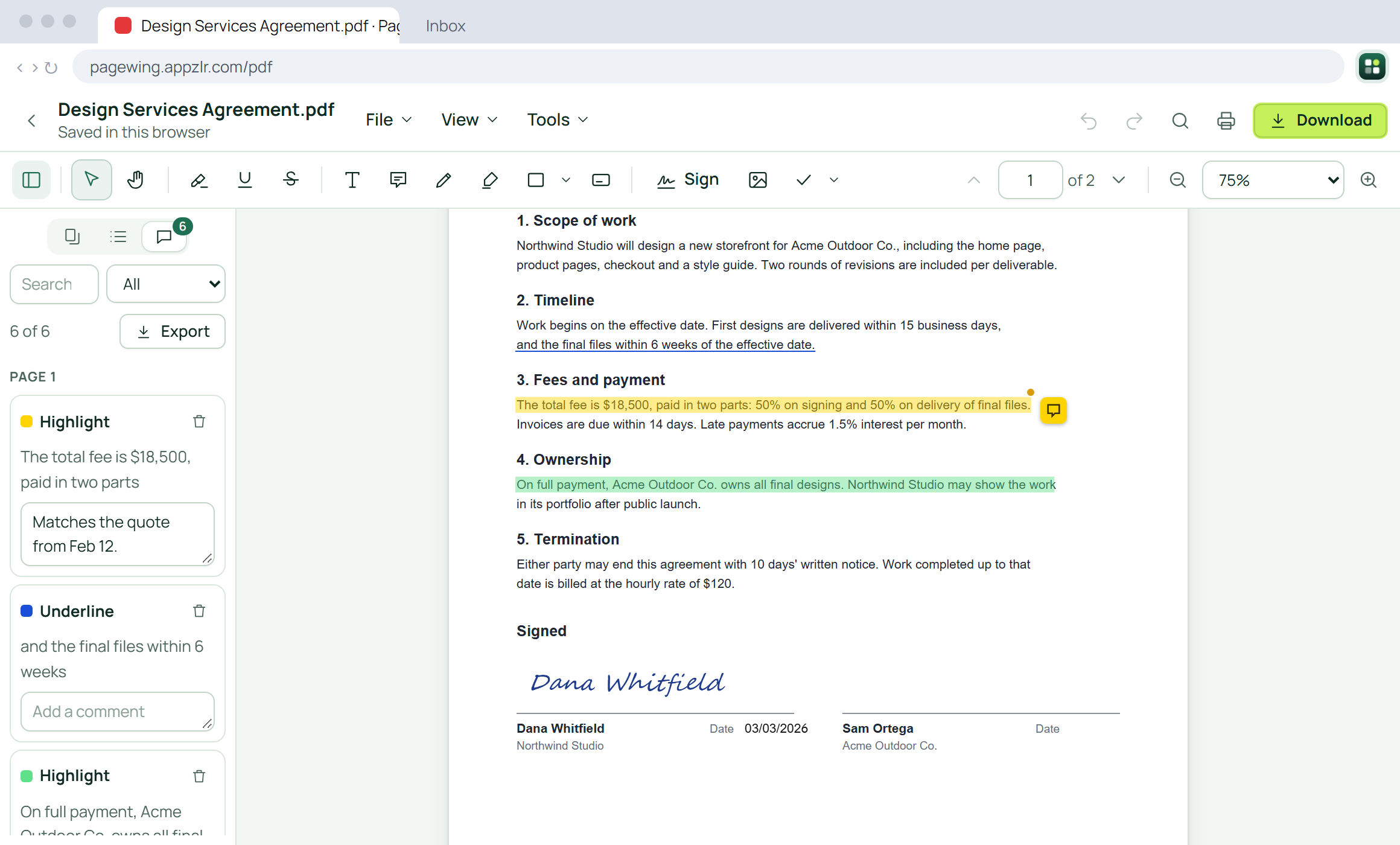
The Pagewing PDF editor with a contract that's highlighted, commented on and signed

A PDF editor, without another app

Open any PDF from the web in Pagewing with one click. Highlight, comment, fill in forms and sign it, reorder pages, then merge, split, compress, protect or convert it. Your PDFs stay on your computer unless you save them to your cloud, and viewing and editing are unlimited and free.

  • Highlights, comments, text, shapes, signatures and stamps
  • Merge, split, compress, protect and reorder pages
  • Convert to Word, Excel, PowerPoint and images
Open the PDF app
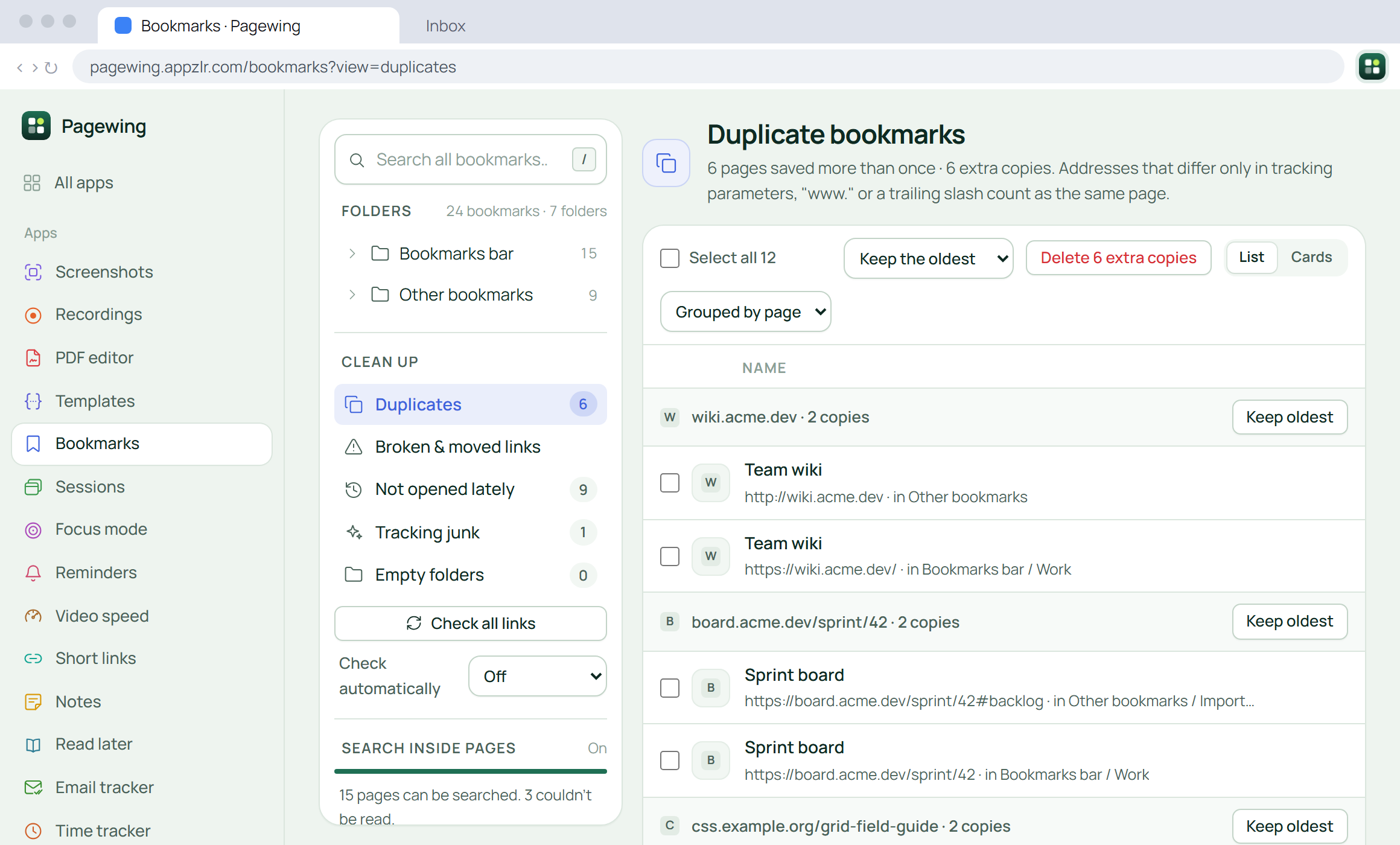
Pagewing bookmark manager listing duplicate bookmarks

Your Chrome bookmarks, organized. Nothing to move.

Bookmark the page you're on into the right folder in a click, search with filters, and clean up years of saved links in the full manager: duplicates, dead and moved pages, and bookmarks you never open.

  • Save all open tabs in one click, undo any delete
  • Duplicates, broken links and empty folders
  • Import from Raindrop.io or any browser, with tags and notes
  • Search the words inside your pages, on Premium
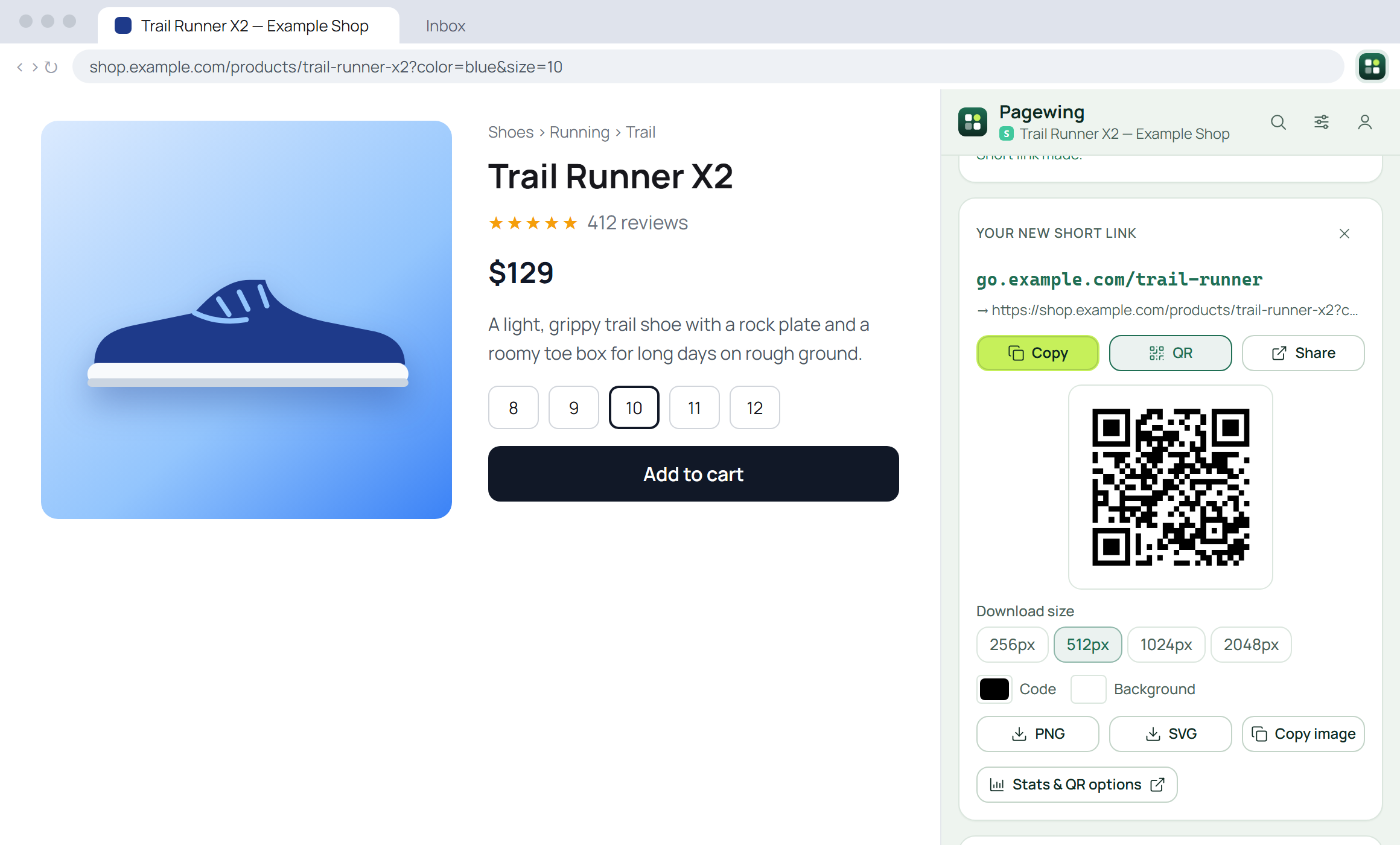
Pagewing side panel with a new short link and QR code for a shop page

Short links and QR codes for any page

Shorten the address of the page you're on, pick a custom alias, and get a QR code to download. Every link, with its clicks over time and where they come from, is on your Short links page.

  • Custom aliases, and change where a link goes later
  • Clicks by day, referrer, country and device
  • QR codes, tags, bulk create, and your Bitly links imported
  • Device and country redirects and an API on Pro
  • No ad pages, ever, not even on your printed QR codes
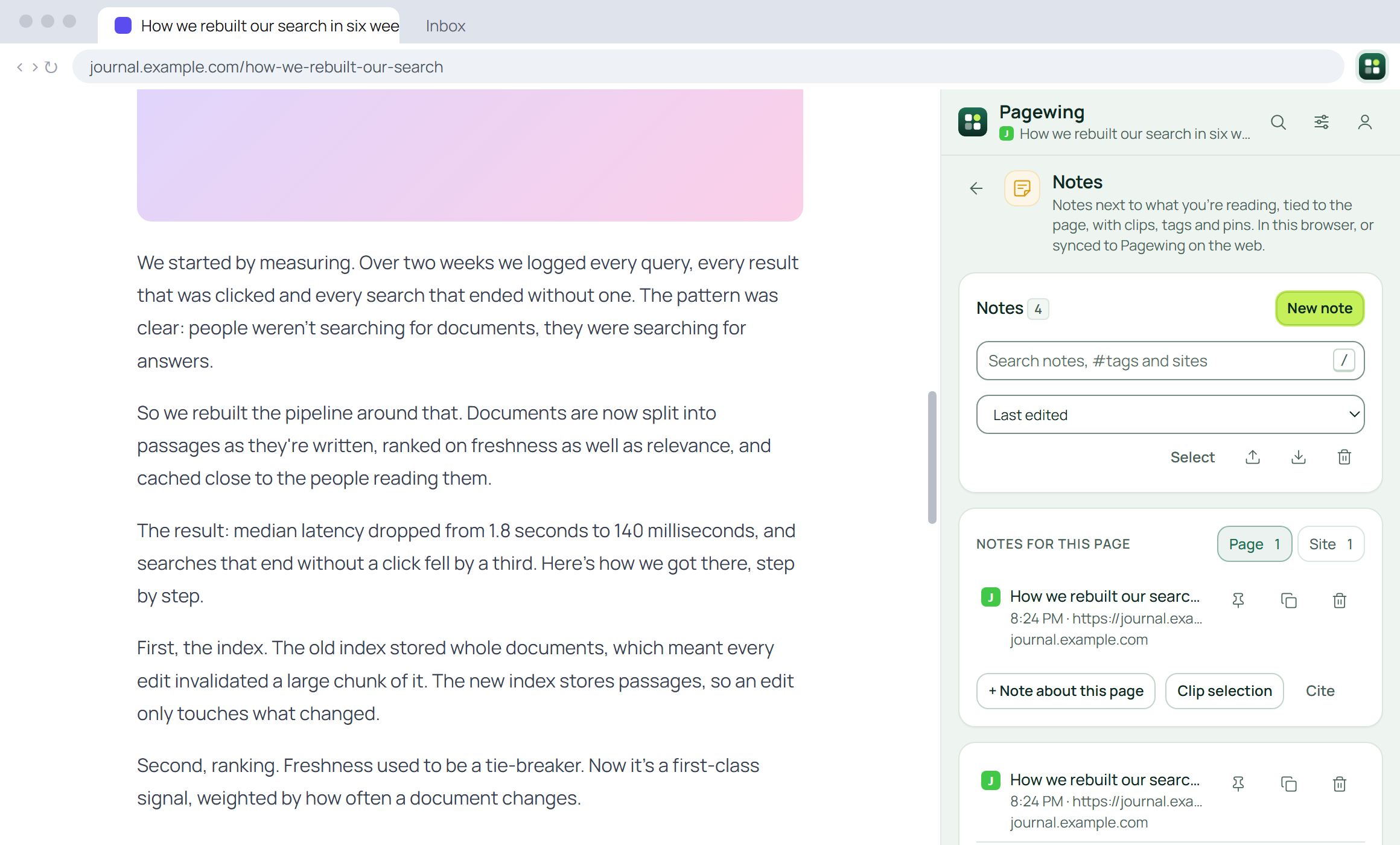
Pagewing notes beside an article

Private notes and highlights, in a side panel

Clip the passages that matter with their link and jot notes beside them, without switching tabs. Cite the page for school, and turn on sync to organize everything in a full editor on the web.

  • Notes tied to the page you're on, and clips of what you select
  • Citations in APA, MLA and Chicago, from the page's author and date
  • Private in your browser; send to Obsidian or export for Notion

Draw on any page, then screenshot or record it

Pen, highlighter, arrows, shapes, text, numbered steps and a laser pointer, right on the live page. Marks stay on what you marked as a feed loads more or a chat scrolls, come back next time, and go into a screenshot, a recording or a PDF of the whole page.

Tabs saved, restored and shared

Your tabs are saved before they close, every time. Save every open tab in one click, get them back after a crash, keep links and notes with them as a workspace, and share a list with a link.

Text templates, anywhere you type

Save replies with blanks like {{Name}}, then type insert/ or a shortcut in any text box to fill them in and drop them in. Import from Text Blaze, TextExpander or Magical, and export any time.

Plus a stopwatch, timer and Pomodoro

Laps with fastest, slowest and average, a countdown with presets, and a Pomodoro that turns on focus mode while you work. Timers ring even with the panel closed.

Focus mode for distracting sites

A calm pause before the sites you pick, then you choose: go back, or go in for a few minutes. Block sets with their own schedules and allowances, strict sessions and stats, free for up to 500 sites a list, and your LeechBlock or BlockSite list in one go. We never sell your browsing.

Reminders by notification and email

Type "call mom tomorrow at 5pm" and it's set. It rings on time in Chrome, even with the panel closed, and by email too with a subscription. Repeats, snooze and the page you were on. Import your tasks from Todoist, TickTick or Google Tasks.

Any video, at your speed

Set a speed once for YouTube, Netflix, podcasts and every other player, and it keeps working after updates. With keyboard shortcuts, per-site speeds, an A–B loop, picture controls, volume boost to 600%, pitch shift, balance and mono.

A one-click browsing data cleaner

Clear history, cookies and cache from the last hour or all time, keep the sites you trust signed in, or clean only the site you're on. By shortcut, each time Chrome starts or on a schedule, with no ads and no outside requests.

Read later, with highlights

Save any article in one click, highlight what matters on the page in five colors, and read it in a clean reader that remembers where you stopped, or listen to it and get a summary. The home for your Pocket library: import it free.

Know when your emails are read

No ads in your signature. Opens you can trust. Send from Gmail as usual: ✓ when it's sent, ✓✓ once it's opened, with automatic opens left out. Notifications, link clicks, no-reply nudges, send later and your templates in the compose window, and the full history on the web.

A time tracker in every tab

Start a timer on a project and task in one click or a shortcut, with idle detection, Pomodoro and reminders, then fill in timesheets, fix up the calendar and send reports with billable amounts.

Works on the page you're on

Every tool acts on the tab next to the panel. Switch tabs and Pagewing follows.

How it works

Up and running in a minute

No setup and no settings to learn. Every tool works on the page you're looking at.

  1. Add Pagewing to Chrome

    Install it from the Chrome Web Store, then pin it to your toolbar so it's one click away.

  2. Sign in

    Use Google or your email. Every tool works on the free plan, no card needed. Upgrade to Premium or Pro whenever you want more.

  3. Open the side panel

    Click the Pagewing icon on any page, pick a tool or press Ctrl+K to find one, and go.

Pricing

One subscription replaces the rest

Start free with every tool. Premium removes the limits for $20/month, and Pro covers every job for $30/month, instead of $134.44 a month for the separate apps. That's $104.44 back every month.

Free

$0 forever

  • Every tool, with a few limits
  • Screenshots of the view, an area or the full page
  • 15-minute recordings3 saved PDFs a day25 short links25 saved sessions
  • 50 notes20 templates
  • Autoscroll, stopwatch and focus mode in full
Add to Chrome, free

Pagewing Premium No free-plan limits

$20/month cancel anytime

Billed monthly.

  • Every tool without the free plan's limits
  • Recording share links, PDF signatures, scrolling-panel captures and bulk actions
  • Custom short links, tags and detailed stats
  • Cloud storage and reminder emails
  • Use it on up to 5 browsers
  • 14-day money-back guarantee
Get Premium

Questions

Something else? Write to us from the Support link below.

How do you work out the savings?

We added up what the leading standalone app for each job charges one person on its own pricing page, billed monthly where they offer it (checked October 2026), and took away the price of Pagewing Pro, which does every one of those jobs. The table lists each one's plan and price. Those apps aren't identical to Pagewing, and some do more in their own field, but it's what you'd pay to have each of those jobs covered.

What's the difference between Premium and Pro?

Both remove the free plan's limits from every tool, on all your browsers. Premium adds most paid features, like scrolling-panel captures, bulk actions, share links, PDF signatures and cloud storage. Pro adds everything else: conversions to Word, Excel and PowerPoint, the bookmark broken-link check and invoices from tracked time. There are no add-ons or per-tool prices, and you can switch plans from your account page anytime. The few limits paid plans do have, like cloud storage space, are listed on the pricing page.

Is Pagewing free?

Yes. Every tool works on the free plan, with a few limits (like 15-minute recordings and 25 short links). No card needed. You only add one if you decide to upgrade.

What happens if I cancel?

Your plan runs to the end of the period you paid for, then you move to the free plan. Every tool keeps working with its free limits. Your notes, bookmarks and short links are untouched, and short links you already made keep redirecting.

Does it work on every site?

Pagewing works on normal web pages. Chrome doesn't let extensions control its own pages (chrome://, the Web Store) or some protected viewers.

Where do screenshots and recordings go?

Recordings go where you choose: with Share link (Premium and Pro), they upload to your Pagewing cloud while you record, and the link is copied when you stop; with Save to computer, they go straight to your Downloads folder and never leave your computer. Screenshots open in the Pagewing editor on our website, saved to your account so you can edit and download them from any browser; or set the extension to save them straight to your Downloads folder instead.

Can I use Pagewing on another computer?

Yes. Sign in to the same account in Pagewing on the other browser and your plan comes with you.

Cancel the stack. Keep $1,253 a year.

Start free with every tool, no card needed. When you're ready, one subscription replaces the rest.

Add to Chrome, free